
News, reviews, and commentary, as well as PC maintenance and problem solving
Showing posts with label windows 7. Show all posts
Showing posts with label windows 7. Show all posts
Thursday, 15 November 2018

Monday, 14 November 2016
Windows 7 takes forever to download and install updates from a fresh install
Those that have recently reformatted a hard drive and re-installed Windows 7 knows only to well the eternity it takes to download and install Windows updates. Here is a quick way to cut short that process time.
http://www.sevenforums.com/windows-updates-activation/394671-update-not-updating.html
http://www.sevenforums.com/windows-updates-activation/394671-update-not-updating.html
Thursday, 10 July 2014
Windows 7 Can't go to sleep - resolved
http://www.pixelapes.com/2010/01/15/windows-7-cant-go-to-sleep/
One of the best little bits of info in here was the -
powercfg /devicequery wake_armed
command in command prompt (administrator).
One of the best little bits of info in here was the -
powercfg /devicequery wake_armed
command in command prompt (administrator).
Tuesday, 15 October 2013
Windows 7 'this file does not have a program associated'
Sometimes you get an error message when you try and open up some folders
that the association is missing. This may be from some corruption in
the registry or OS.
I solved the problem by going here
http://www.sevenforums.com/bsod-help-support/188220-windows-7-explorer-exe-file-does-not-have-program-associated-error.html
and then following Whizzkidraj's instructions. He points us to here
http://www.winhelponline.com/blog/file-asso-fixes-for-windows-7/
which is a file association index page. I clicked on Folder (because this was the area of trouble for me) and then downloaded the .reg file to the desktop. I right clicked on this and then merged it with the registry and then folders would open as they should.
I solved the problem by going here
http://www.sevenforums.com/bsod-help-support/188220-windows-7-explorer-exe-file-does-not-have-program-associated-error.html
and then following Whizzkidraj's instructions. He points us to here
http://www.winhelponline.com/blog/file-asso-fixes-for-windows-7/
which is a file association index page. I clicked on Folder (because this was the area of trouble for me) and then downloaded the .reg file to the desktop. I right clicked on this and then merged it with the registry and then folders would open as they should.
Saturday, 15 September 2012
Add the Recycle Bin to Windows 7 Start Menu
Here's a tutorial to add the Windows Recycle Bin to the Start Menu. If, like me, you don't like any icons on your desktop then you can use this tutorial to add a recycle bin within the Start Menu instead of it appearing on the desktop.
Wednesday, 12 September 2012
Opening up Windows Explorer to default to My Computer, instead of Libraries
One thing that has bothered me of late going back and forth several operating systems, is that Windows Explorer defaults to Libraries all the time, instead of my favoured My Computer layout.
So I've done something about it at last and made Windows Explorer default to My Computer.
Here's the steps -
Click on the Start Button, and enter 'Windows Explorer' in the search programs and files box. Move the mouse to where Windows Explorer has been found in the search box and right click on Windows Explorer. Then click on properties.
 Now, look at the 'Target' box and right at the end of %windir%\explorer.exe, add a space and two quotation marks ("").
The Target should now read %windir%\explorer.exe "".
Click on apply, and then OK.
The next time you hit Windows Explorer, you should be directed to My Computer as opposed to the Libraries boxes.
NOTE - You can also set up the target to open up whatever you desire. SImply don't add the double quaotations (""), but just add the relevant path, and Windows Explorer will open it to that.
For example, if I wanted Windows Explorer to point to the C: drive just type %windir%\explorer.exe C: as the target. If you want to open up a specific folder, then that can be done also, for example D:\Setup can be accessed by typing %windir%\explorer.exe D:\Setup in the target path!
So I've done something about it at last and made Windows Explorer default to My Computer.
Here's the steps -
Click on the Start Button, and enter 'Windows Explorer' in the search programs and files box. Move the mouse to where Windows Explorer has been found in the search box and right click on Windows Explorer. Then click on properties.
The Target should now read %windir%\explorer.exe "".
Click on apply, and then OK.
The next time you hit Windows Explorer, you should be directed to My Computer as opposed to the Libraries boxes.
NOTE - You can also set up the target to open up whatever you desire. SImply don't add the double quaotations (""), but just add the relevant path, and Windows Explorer will open it to that.
For example, if I wanted Windows Explorer to point to the C: drive just type %windir%\explorer.exe C: as the target. If you want to open up a specific folder, then that can be done also, for example D:\Setup can be accessed by typing %windir%\explorer.exe D:\Setup in the target path!
Wednesday, 5 September 2012
My Linux troubles - Ubuntu, Xubuntu and Mint
Okay, to start off let me give you some background information about what I do and how I go about my personal computing. As well as running a business I am interested in web browsing, I use word and spreadsheet programs, download the odd thing here and there and use my PC as a network streamer to my PS3. An occasional game is installed and pictures and videos are stored locally to use with Fast Stone and/or Picasa. I also take an interest in holding some personal content offline via Drop Box or Google Drive. Basically, my PC is just a functional everyday bit of kit to get work done.
I am no novice as 14 years of real world computing will testify, but neither would I branch myself into the high-tech category. I do what needs to be done, I learn what needs to be learned to stay one step ahead of my clients who are primarily home users with some businesses thrown in.
Through these blog pages I have aimed to keep everything as simple and straight forward as possible. IT experts may have the best intentions when setting out instructions, reviews and troubleshooting tips and tricks but inevitably what they perceive as real world explanations and real world clients do not match with mine. My clients, in my 'real world', are interested in web browsing, will do the minimum to protect their computer (if indeed they have any protection at all), want to social network, and just want the machine to function normally and with stability venturing only occasionally into uncharted territory when installing programs and applications. And that's about it. This is the cross section that I deal with, and I'll bet I wouldn't be far off the mark if I categorised these people as your 'average user'.
With all the furore over the release of Windows 8 next month, I once again sat down and looked at my existing set-up, Windows 7 on drive C:, an external drive for data, music and backups, and a drive D: that I dabble with from time to time should I want to try the latest fad out. I have also been stewing over re-testing Linux products, namely Ubuntu Unity, Xubuntu and Mint. I want to be drawn into this world. I don't hate Microsoft just because they are a big nasty company (or at least the perception goes), I use their products and I get things done. But, I've always been a backer of the underdog, and should a time come where I have an OS that matches a Microsoft offering, I would jump ship in a heart beat.
I'm intrigued by open source, I love the concept that many hands are trying to make the best free alternative to MS. But what has always held me back is that I've never fully felt Linux meets my needs, or at least eventually down the line something will go wrong that I just need Windows back for. If I remember correctly I got on quite famously with Ubuntu 10.04. Barring some hickups I think generally I liked it. It was only when for some unexplained reason the graphics drivers starting playing up, reboot and sleep weren't functioning as they should and crashes from various applications started to become more frequent that I steered away from it. But now, down the line, I convinced myself that it could be Linux's time.
Okay, so Ubuntu Unity 12.04 was installed a few weeks ago. Getting to grips with the installation was the first problem I see for the uninitiated. I wanted to put Ubuntu on a second drive and so had to opt for 'something else' on the installation. After a couple of errors on my part, Unity started installing. Boot times are quicker with Unity over Windows 7 but I encountered some problems straight off the bat. The screen was always ever so slightly out of sync on the horizontal which started to drive me nuts. Crashing of browsers was quite frequent, restart didn't work, and trying to configure Unity with my PS3 was a complete and utter ball ache. It just wouldn't work. Peripherals installed without a hitch and the interface was decent. I still found it slightly disconcerting though that button presses seemed unresponsive, like there was always something nagging away in the background that was taking an extra second or two to initiate.
I run an old Athlon X2 4200+ with 3gb Ram and an okay GPU, so I wasn't expecting miracles. The Unity feel will split the community but I thought it looked pretty decent. It's a good effort in my book, but once again I found myself with an OS that is near to being usable but which is still a little too inaccessible and too unstable.
Xubuntu 12.04 was my next big white hope. It is supposed to be lighter on RAM and without the bells and whistles of Unity, Kubuntu and even Mint. Installation failed once and took the second time. Not a great start. Customisation proved relatively easy and within a few steps I was able to change the horrible foggy look to something crisp. Again though there were initial problems with graphics, boot times weren't great, the login screen time took an eternity, and generally it just felt unstable. Trying to install a dock at the bottom to get rid of that garish panel proved impossible. The default web browser launcher couldn't find Chromium of which I had to manually alter. Because I had not selected 'automatically boot into OS on startup' during installation trying to get the machine to err, boot straight from the login screen proved difficult now, relying on adding bits of code into documents. Then the annoying keyring thing kept popping up with every browser load. Aarrghhhh. There were just a plethora if small things which just ground me down, and eventually I had had enough.
So it was over to Mint. After three failed installations I gave up. Now my secondary hard drive is awaiting Windows 8, which I must say, I am really not looking forward too. As an experiment yesterday I tallied up the amount of times I hit the start button. To my amazement, it was lots. I hope the new Metro UI accounts for the type of user I am.
In short then, I want to love Linux and am desperate for the day when Windows has a serious rival on it's hands. To the Linux initiated they will point to the argument that 'Linux isn't Windows' etc etc. But, they are missing the point too if that is their stance. Linux is only ready for the advanced user who is willing to spend huge amounts of time to get things to work, have a knowledge of terminal commands, understand the way files are layered, and are willing to mess about endlessly to get graphics cards, drivers, applications etc to work as they should. As stated I got on famously with Ubuntu 10.04 before that soon became a bit of a mess, had some limited success with Unity, had a tough time with Xubuntu and just couldn't get Mint to even install.
In my real world, this just won't be tolerated by normal users. They will get confused, disheartened and just downright scared to touch anything. I'm no MS fanboy, but at the moment Windows 7 deals efficiently enough with streaming, security, backup, burning, music, games, office applications, peripherals and devices, downloading, browsing, media playing and general use. It's not perfect but it's stable and sturdy. I hope one day I can finally go open source and take a Microsoft product off my machine. But until that day, in my opinion, Linux just doesn't cut it at the moment.
I am no novice as 14 years of real world computing will testify, but neither would I branch myself into the high-tech category. I do what needs to be done, I learn what needs to be learned to stay one step ahead of my clients who are primarily home users with some businesses thrown in.
Through these blog pages I have aimed to keep everything as simple and straight forward as possible. IT experts may have the best intentions when setting out instructions, reviews and troubleshooting tips and tricks but inevitably what they perceive as real world explanations and real world clients do not match with mine. My clients, in my 'real world', are interested in web browsing, will do the minimum to protect their computer (if indeed they have any protection at all), want to social network, and just want the machine to function normally and with stability venturing only occasionally into uncharted territory when installing programs and applications. And that's about it. This is the cross section that I deal with, and I'll bet I wouldn't be far off the mark if I categorised these people as your 'average user'.
With all the furore over the release of Windows 8 next month, I once again sat down and looked at my existing set-up, Windows 7 on drive C:, an external drive for data, music and backups, and a drive D: that I dabble with from time to time should I want to try the latest fad out. I have also been stewing over re-testing Linux products, namely Ubuntu Unity, Xubuntu and Mint. I want to be drawn into this world. I don't hate Microsoft just because they are a big nasty company (or at least the perception goes), I use their products and I get things done. But, I've always been a backer of the underdog, and should a time come where I have an OS that matches a Microsoft offering, I would jump ship in a heart beat.
I'm intrigued by open source, I love the concept that many hands are trying to make the best free alternative to MS. But what has always held me back is that I've never fully felt Linux meets my needs, or at least eventually down the line something will go wrong that I just need Windows back for. If I remember correctly I got on quite famously with Ubuntu 10.04. Barring some hickups I think generally I liked it. It was only when for some unexplained reason the graphics drivers starting playing up, reboot and sleep weren't functioning as they should and crashes from various applications started to become more frequent that I steered away from it. But now, down the line, I convinced myself that it could be Linux's time.
 |
| Ubuntu Unity 12.04. Purple. Panels on the left hand side and the emphasis on using the Unity button as a focal point. Some love it some hate it. |
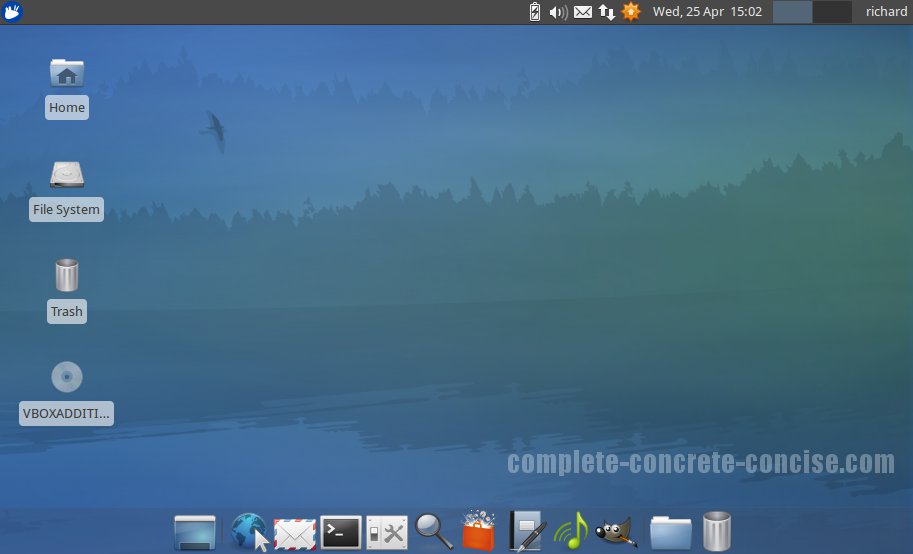 |
| Xubuntu. Foggy blue. Supposed to be more responsive with less RAM strain. |
 |
| Linux Mint.....err, couldn't get it to install after three failed attempts. |
Okay, so Ubuntu Unity 12.04 was installed a few weeks ago. Getting to grips with the installation was the first problem I see for the uninitiated. I wanted to put Ubuntu on a second drive and so had to opt for 'something else' on the installation. After a couple of errors on my part, Unity started installing. Boot times are quicker with Unity over Windows 7 but I encountered some problems straight off the bat. The screen was always ever so slightly out of sync on the horizontal which started to drive me nuts. Crashing of browsers was quite frequent, restart didn't work, and trying to configure Unity with my PS3 was a complete and utter ball ache. It just wouldn't work. Peripherals installed without a hitch and the interface was decent. I still found it slightly disconcerting though that button presses seemed unresponsive, like there was always something nagging away in the background that was taking an extra second or two to initiate.
I run an old Athlon X2 4200+ with 3gb Ram and an okay GPU, so I wasn't expecting miracles. The Unity feel will split the community but I thought it looked pretty decent. It's a good effort in my book, but once again I found myself with an OS that is near to being usable but which is still a little too inaccessible and too unstable.
Xubuntu 12.04 was my next big white hope. It is supposed to be lighter on RAM and without the bells and whistles of Unity, Kubuntu and even Mint. Installation failed once and took the second time. Not a great start. Customisation proved relatively easy and within a few steps I was able to change the horrible foggy look to something crisp. Again though there were initial problems with graphics, boot times weren't great, the login screen time took an eternity, and generally it just felt unstable. Trying to install a dock at the bottom to get rid of that garish panel proved impossible. The default web browser launcher couldn't find Chromium of which I had to manually alter. Because I had not selected 'automatically boot into OS on startup' during installation trying to get the machine to err, boot straight from the login screen proved difficult now, relying on adding bits of code into documents. Then the annoying keyring thing kept popping up with every browser load. Aarrghhhh. There were just a plethora if small things which just ground me down, and eventually I had had enough.
So it was over to Mint. After three failed installations I gave up. Now my secondary hard drive is awaiting Windows 8, which I must say, I am really not looking forward too. As an experiment yesterday I tallied up the amount of times I hit the start button. To my amazement, it was lots. I hope the new Metro UI accounts for the type of user I am.
In short then, I want to love Linux and am desperate for the day when Windows has a serious rival on it's hands. To the Linux initiated they will point to the argument that 'Linux isn't Windows' etc etc. But, they are missing the point too if that is their stance. Linux is only ready for the advanced user who is willing to spend huge amounts of time to get things to work, have a knowledge of terminal commands, understand the way files are layered, and are willing to mess about endlessly to get graphics cards, drivers, applications etc to work as they should. As stated I got on famously with Ubuntu 10.04 before that soon became a bit of a mess, had some limited success with Unity, had a tough time with Xubuntu and just couldn't get Mint to even install.
In my real world, this just won't be tolerated by normal users. They will get confused, disheartened and just downright scared to touch anything. I'm no MS fanboy, but at the moment Windows 7 deals efficiently enough with streaming, security, backup, burning, music, games, office applications, peripherals and devices, downloading, browsing, media playing and general use. It's not perfect but it's stable and sturdy. I hope one day I can finally go open source and take a Microsoft product off my machine. But until that day, in my opinion, Linux just doesn't cut it at the moment.
Monday, 3 September 2012
Windows 7 tops XP for first time


By Daniel Mackrell
Posted on 3 Sep 2012 at 16:18
Windows 7 has become the most popular desktop operating system for the first time since it was launched in 2009.
Net Applications statistics show that Windows 7 currently has a 42.76% share of the global market, compared to 42.52% for Windows XP.
Over the last 12 months, Windows 7 has grown its market share by 12% - helped by Microsoft cutting XP support from April 2014. It's also likely helped by neither XP nor Vista supporting the soon-to-be-released Office 2013.
That growth could be set to stall with the imminent release of Windows 8. Windows users will be able to upgrade to Windows 8 for £24.99 once it is released, which will likely hit next month’s figures as some users switch to the new operating system and others buy PCs and tablets with it already installed.
However, if Windows 8 doesn’t impress its users, Windows 7 could benefit, as Microsoft has confirmed those with Windows 8 Pro will be able to downgrade their PCs to the older OS if they prefer.
While the arrival of Windows 7 started the decline of Vista, the launch of that much derided OS didn't do much to dent XP's popularity. Windows Vista's market share is continuing to decline, falling from 9.4% last August to 6.15% this year - although an overall share of 92% means that there is no danger of Microsoft losing its dominance any time soon.
Read more: Windows 7 tops XP for first time | News | PC Pro http://www.pcpro.co.uk/news/376705/windows-7-tops-xp-for-first-time#ixzz25QtDUU8b
Source PC Pro - http://www.pcpro.co.uk/news/376705/windows-7-tops-xp-for-first-time
Friday, 17 August 2012
Customisation of Windows 7 logon screen
It's easy to change the Windows 7 logon screen with just a few clicks.


Firstly, you should backup your PC before following this tutorial. Next, launch a web browser and go to www.snipca.com/6431.

The screen should appear like this. Be careful to click on the 'Download' button circled in red, any other download buttons may download something completely different from what you are intending.
Ignore any security or browser warnings and click either Open or Run. Once downloaded use a tool such as Pea Zip or Winrar to unpack the compressed .rar file to the Windows desktop.
Next double click the folder to open it and double click the LogonScreenTweaker.exe file to launch the program. From here you can change the background screen, the user image and utilise a host of other options by clicking on the Options menu.

The Tweaker screen should look like this. As you can see the user picture has been changed along with the logon screen background. The options menu is on the left hand side, whilst the options to change background picture and user picture are central to the tweaker box. An option to 'set' is on the right hand side which saves your alterations along with an option to go back to the default layout and background.
Subscribe to:
Posts (Atom)